--==ERROR Codes==--
If there is a problem with the Xbox360 The LEDs in the ring of light will flash in a particular pattern. The pattern itself leads some insight to the problem. Certain patterns will lead to numbered error codes which will provide further insight to the problem. The numbered error codes are described below their corresponding LED code.
=============================
Manufacture Mode
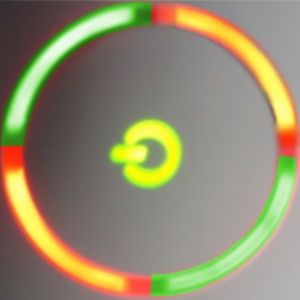
Sections 1, 2, 3, and 4 are flashing red and green
=============================
THINGS TO TRY
1.If you attempted the JTAG hack restore your original NAND image
2.Reflow Southbridge
=============================
Console displays no Red lights. But outputs no audio or video.
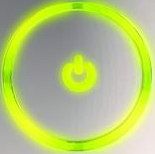
THINGS TO TRY
1.Reflow the GPU and HANA Chips
=============================
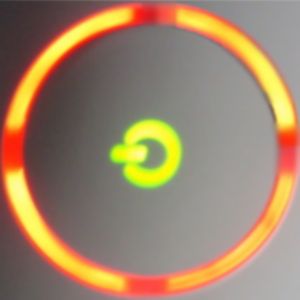
Sections 1, 2, 3, and 4 are flashing red
The AV cable cannot be detected
THINGS TO TRY
1.Make sure that the AV cable is correctly connected to the Xbox 360 console.
2.Disconnect the AV cable from the Xbox 360 console, and then reconnect the AV cable to the Xbox 360 console.
3.If the four flashing red lights continue to flash, try wiping the metal area of the AV pack with a dry cloth. The metal area is the end that plugs into the console. Wipe the metal area thoroughly, and then try the AV Pack again.
4.If the AV cable is correctly connected but the four red lights are still flashing, substitute a different AV cable if you have one available.
=============================
Sections 1, 3, and 4 are flashing red
- General Hardware Failure
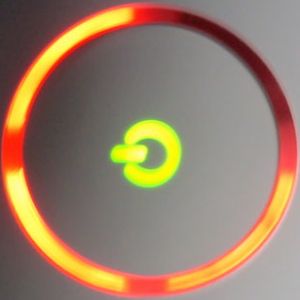
Check the secondary Error Code per the instructions in the section below
THINGS TO TRY
1.Try restarting the console.
2.If restarting the console does not resolve the behavior, follow these steps:
3.Turn the console off.
4.Unplug all the power and AV cables from the console.
5.Unplug the power cord from the wall socket.
6.Firmly reconnect all the cables.
7.Turn on the console.
* If these steps do not resolve the behavior, turn the console off, remove the hard drive, and then turn on the console. If the 3x Red LED error light is no longer displayed, turn the console off, re-attach the hard drive, and then turn on the console.
* Also examine the lights on the power supply. When you turn on the console, the power supply light should illuminate green even if the three lights on the RoL flash red.
=============================
Sections 1, and 3 are flashing red
- Overheating
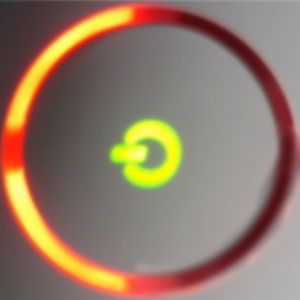
Alternatively Overheating can be cause by the console locking up or "freezing" after a set amount of time. Lockups that occur at a specific point in a game are generally problems with the game itself and not caused by overheating.
THINGS TO TRY
1.Let the Xbox 360 console cool.
2.Note You may have to wait several hours for the console to cool enough. Do not turn on the console when the console is hot.
3.Verify that the console has sufficient ventilation and that the fan is operating. For more information about ventilation, see the "More Information" section.
PREVENTION SUGGESTIONS
To try to prevent this problem, use the following precautions:
1.Do not block any ventilation openings on the Xbox 360 console.
2.Do not put the Xbox 360 console on a bed, on a sofa, or on any other soft surface that may block ventilation openings.
3.Do not put the Xbox 360 console in a confined space, such as a bookcase, a rack, or a stereo cabinet, unless the space is well-ventilated.
4.Do not put the Xbox 360 console near any heat source, such as a radiator, a heat register, a stove, or an amplifier.
DO NOT EVER PUT YOUR CONSOLE IN THE FREEZER OR OUT IN COLD WEATHER
Some people think that doing this might help "fix" an overheating console, in fact doing so could cause even bigger problems. Electronic devices like your console are made to function at and around room temperature, extreme cold temperatures can often cause just as many problems as extreme warm temperatures (such as overheating). Also if the console is located in a dramatically cold area while running, the difference in temperature between the hot console and cold air can create condensation which in turn will short out your console making the situation far worse. Condensation will happen more quickly if your console is overheating due to the greater difference in temperature. In short... DON'T DO IT.
A more aggressive Solution to overheating is to improve the cooling system of the console. The best solution is to replace the thermal compound. If you attempt this you do so at your own risk. If you're console is still under warranty it is recommended that you contact MS for a replacement before attempting to fix it yourself.
=============================
Section 4 is flashing red
- Hardware Failure
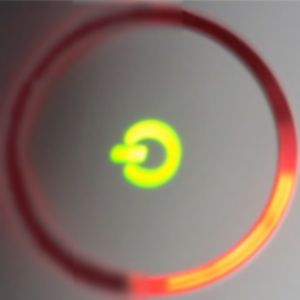
The Specific Type of hardware failure can be determined by the error code displayed on the screen.
If the screen is blank or you would like additional information follow the instructions for determining the secondary error code in the section below
E64 - This error occurs if something goes wrong while flashing the drive or installing a modchip.A sign for it is that the dvd-drive doesnt eject the tray anymore. DVD drive timed out during reset. It can also be caused by a faulty DVD power or SATA cables(edsondario & Fios89)
E65 - This error occurs if something goes wrong while flashing the drive or installing a modchip. A sign for it is that the dvd-drive can still be flashed and read out. According to XBH: DVD drive is not DMA configured
E66 - This error occurs when you replace the dvd-drive and forget to spoof it with the correct version string of the drive you replaced....
E67 - This error occurs when your harddrive is defective, it might still work sometimes....Hard drive timed out during reset. There is also a small chance that it is a cold joint under the Southbridge causing problems with the I/O of the HDD.
E68 - This error occurs when your harddrive is defective, it might still work sometimes.... It can also happen because of a bad eeprom or a wrong security sector.It can also be a problem with the internal connection of the harddrive to the mainboard...According to XBH: Hard drive not DMA configured
E69 - This error occurs when your harddrives security sector is unreadable, if you have played around with that make sure to have the correct security sector on the drive. However it could also just be defective and trigger the error because of that.
E70 - HDD Error (Corrupt Filesystem/partitions) or Hard drive not found
E71 - This error is related to a failed dashboard update, can also be NAND related if you have an Infectus chip. It can also often be caused by a cold joint under the Southbridge(if it wasnt caused by an update). According to XBH: Error within Xam
E72 - This error is related to a loose pin or a not existent NAND chip, can also happen if you flashed it badly with an Infectus chip and/or the NAND is dead. According to XBH: Error within Xam
E73 - This error is caused by a cold solder joint under the Southbridge or the ethernet chip.In rare cases it can also be triggered by a cold joint under the GPU on one of the lines that run to the Southbridge chip. And missing parts(caps, resistors...) under the Southbridge can trigger this error as well.
E74 - This error is caused by a cold solder joint under the GPU, (H)ANA-chip or in between. Mostly it is one of the outer solder balls on the side facing the (H)ANA chip so a shim increases the chanced of success quite a bit. Can also be a component that is missing or damaged so look for missing parts near the GPU and the (H)ANA chip.
E75 - This error is related to the network chip, might be power related or so.This can happen while installing and NME 2. In general it sounds like a cold solder joint somewhere there.However it can also be a Hitachi DVD-drive that is not connected... According to XBH: Couldn't read ethernet phy vendor/wrong ethernet vendor
E76 - This error is caused by a dead network chip.This can happen when a lightning hits your house and the network chip is under high voltage. According to XBH: Couldn't complete ethernet reset
E77 - This error is caused by a dead network chip. It can occur when your house gets hit in a thunderstorm. According to XBH: phy request is already processing/ reading reg failed/ Failed to write reg
E78 - AsicId check failed
E79 - This error occurs when your harddrive is defective, it might still work sometimes....
There is also a small chance that it is a cold joint under the Southbridge causing problems with the I/O of the HDD. It can also be related to wiring the diodes while JTAGGING. Couldn't start xam.xex
E80 - Wrong LDV version in NAND Flash. You have the new dashboard update but not the resistor R3T6, follow known fixes to see how to resolve the problem.
=============================
--==SECONDARY ERROR CODES==-
The specific type of hardware failure can be determined by a "hidden" error code
Turn the xbox 360 on, and wait till the 3 red lights are flashing.
Press and hold the sync up button (the small white one), while holding that button press the eject button.
The LEDs will now blink the first number in the code (as described below).
Release the eject button and press it again.
The LEDs will now blink the second number of the code.
Release the eject button and press it again.
The LEDs will now blink the third number of the code.
Release the eject button and press it again.
The LEDs will now blink the forth number of the code.
Release the eject button and press it again.
The LEDs will go back to the 3 red flashing lights.
You should be able to determine the difference between the 3 flashing lights and the error code lights by the rate in which they flash.
Here is how you interpret the LEDs to get the code number:
* All four lights flashing - 0
* One light flashing - 1
* Two Lights flashing - 2
* Three lights flashing - 3
0000 - The Xbox doesnt know whats wrong it freezes after showing the first digit(0) of the error code.Might be a cold solder joint somewhere under the GPU as someone fixed it with the X-Clamp replacement, might also be scaler or Southbridge related since this is where the error code is calculated...
0001 - power supply problem
0002 - Network Interface problem
0003 - Power problem could be the PSU could be the GPU/CPU, somehow the console isn't getting clean power from the power supply.
0010 - There is a problem with the Southbridge Chip usually dealing with how it connects to the mainboard (cold solder joint/bridged solder joints)
0011 - CPU over heating - If you are receiving this error after disassembling your console make sure to all 8 of the heatsinc screws are tightened securely to the board/heatsink holes.
0012 - GPU over heating
0013 - RAM over heating
0020 - This error is caused by a bridged solder joint under CPU, GPU or one of the RAM bricks.
This effect can also be caused by tin whiskers leading to shorts and if the GPU was taken off the mainboard this error will also show up.
It can also be power related(the CPU/GPU or RAM isnt getting enough power). Can also be a component that is missing or damaged so look for missing and bridged parts near the GPU.
If the console was jtagged and the resistors and cables are still connected it will show 0020, the parallel port can stay as long as no PC is connected.
0021 - This can be caused by two completely different things either:
A. DVD Drive Time out - Can be caused by problems with a firmware flash. This is also speculated to sometime be caused by a problem with the southbridge chipset on the motherboard based on how it connects to the DVD drive.
B. GPU error, generally caused by a poor connection to the mainboard (cold solder joints/bridged solder joints) See error 102 for more information
0022 - CPU error, generally caused by a poor connection to the mainboard (cold solder joints/bridged solder joints). This can also be triggered by an error with the TSOP.
0023 - This error is unknown but assumed to be a short either under Southbridge and (H)ANA chip or in between these.Look for 0021 and 0022 and reflow the Southbridge-> HANA chip area, the X-Clamp Fix might help as well.
0030 - Problem with temperature control sensor
0031 - This error is caused by a faulty/**** RAM brick, however it can also be caused when the heatsink is shorting out a resistor or like a bad solder joint under the GPU. Also caused by the Southbridge if not properly soldered to motherboard or if it experiences a power short. Can be caused by a backwards power cord or faulty power cord to dvd player.
0032 - Might be temp sensor related, check out 0030
0033 - Might be temp sensor related, check out 0030
0100 - There is a problem with the Southbridge Chip usually dealing with how it connects to the mainboard (cold solder joint/bridged solder joints)
0101 - This error is caused by bridged solder joints under the USB ports or a defective USB device that is connected to it.
0102 - Error in the "Digital Backbone" (CPU/GPU/RAM), this is usually caused by a cold solder joint between the GPU and the mainboard.
There are two theories to fixing this one deals with the "X" clamps that hold down the chips. The other involves re-Heating the chips. DO NOT attempt either of these if your console is still under warranty. If your console is still under warranty return it to the store where it was purchased or call MS to have it replaced.
0103 - GPU Error this is usually caused by bridged solder points where the GPU connects to the mainboard. see error 0102 for more detailed information
0110 - Ram error, this is caused by a cold or bridged solder joint on one of the Ram chips.
0200 - This error is caused by a Cold Joint in the GPU/RAM area similiar to 0102 good results could be achieved with flushing alcohol under the chips, reflowing them and afterwards applying an X-Clamp Fix.
0201 - The error is very rare but it is somehow GPU/RAM related, two people could fix it with the Improved X-Clamp replacement, one had to remove his washers from the RAM in order to get it to work. Check the references for more information.
0220 - This error is unknown but is assumed to be caused by missing resistors, probably on GPU.
0222 - This error is unknown but someone managed to fix it using the X-Clamp replacement.
0232 - "The DVD Drive overheats. This error can be caused by the disconnecting of the DVD Drive. This is usually not the case."(Unconfirmed)
1000 - Kernel can't be launched/signature in NAND Flash chip is broken! It could be possible after bad update. forums.xbox-s...p;#entry4156375
1001 - DVD Drive Error, either incorrect firmware or DVD Time out.
1002 - (not yet known)
1003 - Hard Drive Error... It could be a problem with the Hard Drive itself or a problem with the internal connection to the hard drive, Try removing the hard drive and playing without it
1010 - Hard Drive Error, Can be caused buy a corrupt or missing eProm. See also E68 above
1011 - This error occurs when your harddrives security sector is unreadable, if you have played around with that make sure to have the correct security sector on the drive....
1012 - HDD Error (Corrupt Filesystem/partitions) or Hard drive not found
1013 - This error is related to a failed dashboard update, can also be NAND related if you have an Infectus chip. It can also often be caused by a cold joint under the Southbridge(if it wasnt caused by an update).
1020 - NAND issue (loose pin/ bad flash)
1021 - This error is caused by a cold solder joint under the Southbridge or the ethernet chip.In rare cases it can also be triggered by a cold joint under the GPU on one of the lines that run to the Southbridge chip.
1022 - There is high chance it's a scaler chip problem (the "ANA" or "HANA" chip near the AV cable connection) it can also be caused by a faulty AV cable so check that first. In some cases it is a problem with the GPU and may be repairable by doing the x-clamp replacement (see error 0102)
1023 - DVD drive not connected, connect DVD drive to boot
1030 - This error deals with the Ethernet port's controller chip, a dead chip may not cause the error but removing the Ethernet controller chip does, it may also be caused by other Ethernet related problems.
1031 - This error is caused by a dead network chip.
1032 - AsicId check failed
1033 - it could be cpu/gpu related or it could be psu related, not much info is known for sure. If you installed the JTAG hack on your console it may be related to the wiring being installed poorly.
...
1444 and up There is no "4" in the error codes four lights is a "0" go back and check your code again.
=============================
--==Console Reset Codes==--
Clear All Installed Game Updates and Console Cache
1.Go to the "system" blade
2.Select "memory"
3.Press Y on the HD symbol
4.Press X,X, Left Bumper, Right Bumper, X,X
5.A message will appear saying: "Do you want to perform maintenance on your Xbox 360 storage devices?"
6.Select Yes
Clear Any Failed system updates that cause the console to error.
1With the console off, press and hold the sync up button (the small white one)
2.While holding the sync button press the power button to turn on the console
3.Continue to hold the sync button until the Console has booted up completely.
4.During the boot process the console should clear any failed updates, allowing you to use it normally.
=============================
--==Sending in your Console for Repair==--
If none of the above suggestions work, contact MS customer support get get a support ticket started. If your console is still under warranty DO NOT attempt to open it and fix it yourself. MS will fix it promptly and for free and if you open it you loose the free support.
Check the documentation that came with your Xbox 360 for contact information.
In the US Customer Support can be reached at 1-800-4-MY-XBOX (1-800-469-9269)
 Home
Home Search
 Login
Login Register
 Show Posts